
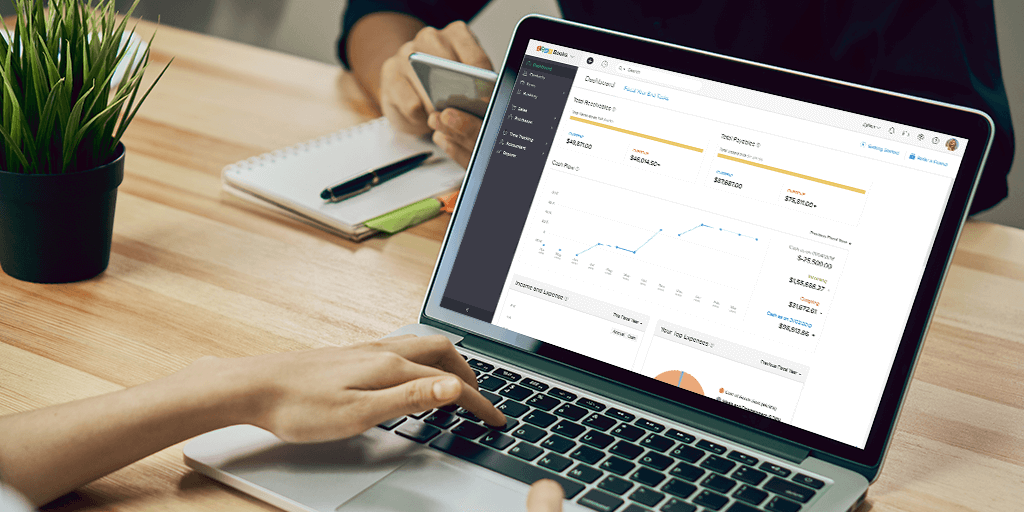
Discover how Accounting Software with Reporting helps businesses streamline financial management, automate reports, track expenses, monitor cash flow, and make smarter financial decisions with real-time insights and accurate accounting data.
Managing business finances requires accuracy, transparency, and timely access to financial information. Traditional accounting methods often involve manual calculations, disconnected spreadsheets, and time-consuming reporting processes. Accounting Software with Reporting provides businesses with a more efficient approach to managing financial activities while generating meaningful insights for better decision-making.
Modern accounting solutions combine financial transaction management, automated reporting, expense monitoring, and business analytics within a connected system. These capabilities help organizations maintain financial records, monitor operational performance, and improve financial planning. For businesses in the UAE, adopting accounting software with integrated reporting capabilities can strengthen financial visibility, support compliance processes, and improve overall operational efficiency.
What Is Accounting Software with Reporting?
Accounting Software with Reporting is a digital financial management solution that combines accounting functions with financial analysis and reporting tools. Instead of manually preparing financial statements, businesses can organize accounting records and generate structured reports using information maintained within the system.
The software helps finance teams monitor financial activities, identify discrepancies, and understand business performance through accessible financial information. It serves as a central platform where daily transactions feed directly into reports that management can review at any time. This approach reduces reliance on fragmented spreadsheets and supports clearer financial oversight across departments.
By bringing transaction data and reporting into one environment, the software enables teams to move from reactive recordkeeping to proactive financial management. Organizations gain the ability to review performance indicators regularly and adjust operations based on current information rather than delayed summaries.
Essential Functions of Accounting Reporting Software
Accounting software with reporting capabilities typically includes several core functions that support day-to-day financial operations.
Financial Transaction Management
Record and organize business income, expenses, and transactions in a structured way. This function ensures that every financial movement is captured consistently and remains available for later analysis.
Automated Financial Reports
Reduce the repetitive work involved in preparing financial statements. Once transactions are recorded, the system can generate standard reports according to predefined rules and periods.
Expense Tracking
Monitor business expenditure across departments and activities. Detailed tracking helps identify spending patterns and supports cost-control efforts.
Cash Flow Monitoring
Understand incoming and outgoing financial movements. Clear visibility into cash positions supports timely payment decisions and liquidity planning.
Financial Dashboards
Present accounting information through visual summaries. Dashboards allow managers to review key indicators without needing to examine every underlying transaction.
Accounts Receivable Management
Track customer payments and outstanding balances. This function helps maintain healthy collections and reduces the risk of prolonged overdue amounts.
Accounts Payable Management
Monitor supplier obligations and payment schedules. Organized payable records support better cash management and stronger supplier relationships.
These functions support organized financial operations and improve management visibility. When used together, they create a more reliable foundation for both daily accounting work and higher-level financial review.
Why Businesses Need Accounting Software with Reporting
Financial reporting plays an important role in understanding business profitability, operational expenses, and overall financial stability. Without reliable reporting systems, businesses may experience delayed financial information, inconsistent records, and difficulties evaluating financial performance.
Implementing accounting software with reporting capabilities helps organizations establish a more structured financial management process. The following areas illustrate the practical value of these systems.
Improved Financial Accuracy
Manual financial calculations can introduce errors that affect accounting records and management reports. Automated accounting workflows help reduce repetitive data entry and support consistent financial calculations. When data is entered once and used across multiple reports, the chance of transcription mistakes decreases significantly. Consistent application of accounting rules further strengthens the reliability of the information presented to management.
Faster Financial Reporting
Preparing financial statements manually requires considerable administrative effort. Accounting reporting software simplifies report preparation by organizing relevant financial information within one accessible environment. Teams can generate period-end reports more quickly and spend less time gathering data from multiple sources. Faster access to completed reports allows management to review performance sooner and respond to emerging trends.
Better Business Decisions
Financial reports provide insights into expenses, revenue patterns, outstanding payments, and operating performance. Management teams can use these insights to evaluate business activities and make informed financial decisions. Clear reporting reduces uncertainty and supports more confident planning around investments, cost controls, and resource allocation.
Key Features of Modern Accounting Reporting Software
Choosing suitable accounting software requires understanding the reporting capabilities that support everyday financial operations. The following features are commonly found in modern solutions.
Real-Time Financial Dashboards
Financial dashboards provide organized views of important accounting indicators. Businesses can monitor revenue, operational expenses, outstanding balances, and financial trends through centralized reporting interfaces. Real-time or near-real-time updates help managers stay informed without waiting for formal period-end statements.
Profit and Loss Reporting
Profit and loss reports summarize business income and expenses over a selected accounting period. These reports help management evaluate profitability and identify opportunities for operational improvement. Clear presentation of revenue streams and cost categories supports targeted analysis of business performance.
Balance Sheet Reporting
Balance sheet reports provide information about organizational assets, liabilities, and equity. Accurate balance sheet reporting supports financial planning and helps businesses understand their financial position. Regular review of the balance sheet contributes to better assessment of solvency and capital structure.
Cash Flow Reporting
Cash flow reports help organizations evaluate money entering and leaving the business. Monitoring cash movements supports financial planning, payment management, and operational stability. Understanding the timing of cash inflows and outflows is essential for maintaining smooth day-to-day operations.
Customizable Financial Reports
Different organizations require different financial reporting structures. Customizable reporting tools allow businesses to organize information according to departments, branches, projects, or management requirements. Flexibility in report design ensures that the information presented matches the decision-making needs of various stakeholders.
Benefits of Automated Accounting and Financial Reporting
Implementing accounting software with reporting can improve financial operations across multiple business functions. Automation and structured reporting deliver several practical advantages.
Reduced Administrative Workload
Automation reduces the repetitive effort associated with recording transactions, preparing reports, and consolidating accounting information. Finance teams can focus more time on analysis and less time on manual data compilation. This shift often leads to higher productivity and lower risk of burnout from routine tasks.
Enhanced Financial Transparency
Centralized accounting records make financial information easier to review and verify. Authorized managers can access relevant reports without depending entirely on manually prepared summaries. Greater transparency supports accountability and helps identify issues earlier in the reporting cycle.
Improved Expense Management
Detailed expense reporting allows businesses to monitor departmental expenditure and identify unnecessary operational costs. Clear visibility into spending categories enables more effective budgeting and cost-control initiatives. Regular expense reviews also support better negotiation with suppliers and more disciplined resource allocation.
Stronger Financial Planning
Historical financial information and current reporting indicators help organizations develop realistic budgets and evaluate financial priorities. Access to consistent data improves the quality of forecasts and scenario planning. Stronger planning foundations contribute to more stable long-term financial management.
Better Collaboration
Connected accounting systems improve coordination between finance teams, management, and operational departments. Financial information becomes more consistent when departments work with approved, shared records. Improved collaboration reduces misunderstandings and supports aligned decision-making across the organization.
Accounting Software with Reporting for UAE Businesses
Businesses operating in the UAE must maintain organized financial records and understand applicable financial reporting and tax requirements. Accounting software can support recordkeeping, transaction classification, financial reconciliation, and preparation of information required for financial reviews.
Supporting VAT and Corporate Tax Recordkeeping
Businesses should evaluate accounting systems for their ability to organize information relevant to UAE VAT and Corporate Tax obligations. Useful capabilities include:
- Maintaining accurate financial transaction records
- Organizing tax-related accounting information
- Supporting financial reconciliation processes
- Preparing structured records for professional review
- Maintaining accessible financial documentation
Software supports compliance activities, but businesses remain responsible for meeting applicable legal requirements and verifying the accuracy of their records. Proper configuration and ongoing review of the system help ensure that tax-related information remains reliable and ready for examination when needed.
How Integrated Accounting Software Improves Business Operations
Modern organizations increasingly prefer integrated financial management systems over disconnected applications. Connecting accounting information with operational workflows can improve data consistency and reporting efficiency.
For example, sales activities, customer invoices, supplier payments, and project expenses can contribute to connected financial records when appropriate integrations are configured. Integrated systems also reduce the need to repeatedly transfer information between different departments. This approach provides management with a clearer understanding of how operational activities influence financial results.
When data flows smoothly between operational and financial modules, reports become more timely and less prone to reconciliation issues. Management gains a more complete picture of performance without needing to assemble information from multiple independent sources.
Choosing the Right Accounting Software with Reporting
Selecting an accounting solution requires evaluating existing business processes and future operational requirements. Organizations should consider several important factors before implementation.
Reporting Flexibility: Choose software that supports relevant financial statements and management reports.
Integration Capabilities: Evaluate compatibility with existing business applications.
Data Security: Prioritize access controls and appropriate financial information protection.
Scalability: Select solutions that can accommodate additional users, departments, and business activities.
User Experience: Consider intuitive interfaces and accessible reporting tools.
Implementation Support: Evaluate configuration, training, and technical assistance.
A suitable solution should align with the organization’s accounting processes rather than introduce unnecessary operational complexity. Careful assessment of current needs and growth plans helps ensure that the chosen system remains useful over time.
X-OPP: Connected Accounting and Business Reporting
X-OPP provides a connected business software ecosystem designed to bring operational activities, finance records, and management reporting into coordinated workflows. Its X-OPP Fin product focuses on connecting accounting with business activity, while X-OPP BI supports management dashboards and reporting.
Depending on the approved implementation scope, connected modules can support shared financial records, reporting structures, approval workflows, and visibility across relevant departments. This connected approach helps organizations reduce information gaps between operational and financial management processes.
Frequently Asked Questions
1. What is Accounting Software with Reporting?
It is software that combines accounting functions with financial reports, dashboards, and analytical tools to support business financial management.
2. Can accounting software generate financial reports automatically?
Yes. Many accounting platforms automate report preparation using recorded financial transactions and configured reporting rules.
3. Is accounting reporting software suitable for small businesses?
Yes. Small businesses can use accounting reporting software to organize transactions, monitor expenses, and understand financial performance.
4. Does accounting software support UAE tax requirements?
Suitable accounting software can support tax-related recordkeeping and reporting. Compliance depends on the configured system and applicable regulations.
5. Why is financial reporting important for businesses?
Financial reporting helps businesses understand profitability, manage expenses, monitor cash flow, and make informed operational decisions.
Conclusion
Accounting Software with Reporting is an essential resource for businesses seeking organized financial management, improved accuracy, and clearer financial visibility. By connecting accounting records with automated reporting tools, organizations can reduce administrative work, monitor financial performance, and strengthen decision-making processes.
As businesses expand, integrated financial systems become increasingly valuable for maintaining consistent information across departments. X-OPP supports this approach through connected finance, operational workflows, and business intelligence solutions that help organizations manage financial information more effectively.
Turn lead response into a system.
Automatically route new leads, prioritize follow-ups and keep your sales team accountable without adding another layer of manual work.